

⚠️ We are not lawyers. This article is for informational purposes only and does not constitute legal advice. We highly recommend consulting with a qualified legal professional to make sure your business is fully compliant with the LGPD and other privacy regulations.
LGPD: TL;DR
If you’re in a hurry, here’s a quick summary of the compliance steps covered in this guide:| Key Rule | Action Item | |
|---|---|---|
| Data Audit | Identify all personal and sensitive data you collect. | List every tool (SEO, Analytics, Forms) and the specific data it stores. |
| Data Minimization | Collect only the absolute minimum information required. | Audit your forms and remove non-essential fields like phone numbers. |
| Sensitive Data | Stricter protection is required for health, religion, or ethnic data. | Use separate, unchecked consent boxes and enable 2FA for data access. |
| Privacy Policy | Transparency is the foundation of LGPD compliance. | Use the WordPress privacy policy generator to create this important document. |
| Cookie Management | Non-essential cookies require explicit opt-in consent. | Add a cookie popup that blocks scripts until the visitor clicks ‘Accept.’ |
| Cookie Policy | Users prefer clear, bite-sized information about trackers. | Generate a separate page listing every cookie’s purpose and duration. |
| Script Blocking | You are responsible for data collected by third-party tools. | Use a plugin to block Google Analytics and Meta Pixels by default. |
| Consent Logging | You must be able to prove consent during a legal audit. | Maintain a secure log of user IP addresses, choices, and timestamps. |
| Right to Opt-Out | Users must be able to revoke consent at any time. | Create a ‘Do Not Sell My Info’ page. |
| Right to Erasure | Users have the ‘right to be forgotten.’ | Use a dedicated form to process deletion requests within 15 days. |
| Data Portability | Users can request their data in a machine-readable format. | Use the WordPress Export Personal Data tool to provide a .zip file upon request. |
What is the LGPD?
The Lei Geral de Proteção de Dados (LGPD) is Brazil’s main data privacy regulation that controls how personal information is collected, processed, and shared. It applies to any individual or organization that processes the personal information of people located in Brazil. Just like other privacy laws, such as the General Data Protection Regulation (GDPR), LGPD doesn’t just affect websites or businesses based in Brazil. It can actually affect many WordPress websites, blogs, and organizations all over the world. If you handle data related to people living in Brazil, then the LGPD may apply to you, regardless of your location. When I first reviewed the LGPD’s definition of ‘personal data,’ I was surprised by how broad they are. To start, it includes any information that can identify a person, including:- Full names, initials, and surnames.
- Contact details such as personal email addresses and phone numbers.
- Digital identifiers including IP addresses and cookie data.
- Location data like GPS coordinates or physical residential addresses.
- Racial or ethnic origin.
- Religious beliefs or political opinions.
- Health data or genetic and biometric information.
Why Should WordPress Users Care About LGPD Compliance?
If you ignore the LGPD, then you could face serious consequences, including large fines. If you break these privacy laws, then the Brazilian National Data Protection Authority (ANPD) can issue fines of up to 2% of your total revenue in Brazil, for the previous fiscal year. I remember when I first looked at these numbers. I was shocked to see that the maximum fine can reach 50 million Reais per violation! Even worse, these costs can add up quickly if authorities discover multiple infractions during an audit. However, complying with the LGPD isn’t just about avoiding fines. It shows readers, visitors, and potential customers that you care about their privacy. By giving your audience more control over their personal information, you’re proving that you’re trustworthy and responsible. In fact, when I started being more transparent with my audience, I noticed that my engagement rates actually improved! Complying with privacy laws can often lead to more signups and sales, helping you grow your online business in a responsible way.How LGPD Affects Your WordPress Site
While the LGPD covers a lot of ground, there’s a few core principles that will most likely affect you as a website owner:- Users can check their information: Users can ask you to confirm whether you’re collecting and processing their personal data. They can also request a full copy of that information.
- Fix data errors: Visitors can ask you to fix any information that’s incomplete, inaccurate, or out-of-date.
- You must clean up excessive data: Users can request that you delete any data that’s unnecessary, excessive, or processed in a way that doesn’t comply with the LGPD. Even if a third-party collected this data, it’s still your responsibility to delete.
- Users can delete their data: Users have the right to delete personal data, even if it was originally processed with their consent. While this may be frustrating, I’ve found that honoring a deletion request quickly actually improves the user’s impression of your brand.
- Users can move their data elsewhere: Readers can request that their data be moved to another service or product provider. Once again, complying with these requests in a clear and straightforward way can actually improve your brand image.
- Understand who else sees their data: Users have the right to know any public or private entities you’ve shared their information with. I remember being nervous about being so open, but my readers actually thanked me for the transparency.
- Informed consent: You must tell users that they have the right to deny consent, and explain what will happen if they do.
How to Improve Your LGPD Compliance in WordPress
At its core, privacy compliance is really just about being open with your users about how you handle their information. I can’t guarantee that this guide covers every step you’ll need to take, but it will put you in a much stronger position for compliance. As an added bonus, many of the steps in this guide will also help you comply with other privacy laws, such as the California Consumer Privacy Act (CCPA) and Saudi Arabia’s Personal Data Protection Law (PDPL). Now, let’s get started! You can navigate through the main sections by following the links below:- Perform a Data Audit
- Collect Less Data
- Be Extra Careful with ‘Sensitive Data’
- Create a Privacy Policy
- Add a Cookie Popup
- Write a Separate Cookie Policy
- Block Third-Party Scripts
- Track and Log Visitor Consent
- Build Trust with Opt-Outs
- Support the ‘Right to Delete’
- Handle Data Access Requests Efficiently
- Frequently Asked Questions about LGPD
- Additional Resources for LGPD Compliance
Perform a Data Audit
To comply with the LGPD, you must first identify and document every piece of personal data your website collects, processes, and stores. This means performing a complete data audit. To get started, I recommend making a list of every tool that gathers data, such as your SEO tools, analytics plugins, and form builders. You should look at each one and ask if your site explicitly needs that specific piece of information, in order to work. To go a bit deeper, try asking yourself these questions about each plugin or tool:- What specific personal data does it collect? This might be names, email addresses, IP addresses, or sensitive data like religious beliefs.
- Where is this data stored? Is it stored locally on your server or sent to a third-party service outside of Brazil?
- What is the legal basis for collecting this information? Do you have a specific reason for this data processing, such as consent or executing a contract?
- How long is this data kept? Do you have a data retention policy that makes sure you delete the information once it’s no longer needed?
- Is this data shared with anyone? In particular, are there any service providers or advertisers involved in the process?
Expert Insight: Why I Audit My Sites When I started my first WordPress blog, I didn’t give much thought to what was happening behind the scenes. I was just happy to see my traffic growing and my contact forms getting filled out by new readers from all over the world.
Looking back, I realize I was collecting massive amounts of data without a plan. Performing this audit isn’t just a legal chore; it’s about understanding your own digital footprint so you can protect your visitors – and yourself.
Collect Less Data
When it comes to collecting data, I use a simple rule: if I don’t have an explicit use for that data right now, then I don’t collect it. This is called data minimization, and it’s the best way to stay LGPD-compliant. It means you only gather information that’s adequate, relevant, and strictly necessary for your site to function. After performing a data audit, I recommend looking critically at all the data you currently collect. Do you really need every piece of information, or are you just keeping it on the off-chance it might be useful later? When you avoid asking intrusive questions, you clearly demonstrate that you respect the user’s privacy. This will make visitors feel more confident and comfortable interacting with your site because they know you aren’t trying to get as much information out of them as possible. By contrast, I find that asking for too much information actually slows down a site’s growth. For example, if someone is trying to join your membership site on a slow mobile connection, every extra field is another reason for them to give up and leave. By asking for less, you aren’t just staying legal – you’re making it easier for people to sign up.Be Extra Careful with ‘Sensitive Data’
Sensitive data carries a much higher legal risk and a significantly higher threshold for LGPD compliance. It includes information about a person’s racial or ethnic origin, religious beliefs, political opinions, or even their health and genetic data. You should also consider that some questions may indirectly reveal sensitive information. For example, asking about a person’s dietary requirements could technically reveal their religious beliefs or a medical condition. In that case, you may be able to rephrase your questions to get the info you need, without touching a sensitive category. If you absolutely must collect sensitive personal information, then you should take these extra precautions straight away:- Separate Checkboxes: When requesting sensitive information, you must use a separate consent box that’s unchecked by default. You cannot rely on ‘standard’ consent or a general “I agree to the terms” box. The LGPD requires that consent for sensitive data be specific and highlighted, meaning it must stand out and clearly explain the exact risk and purpose.
- Stricter Security: Because the harm of a breach is higher, your security must be tighter. I recommend using advanced encryption tools like AES 256 for your database, plus enabling Two-Factor Authentication (2FA) for any account that can view this sensitive information.
- Data Protection Impact Assessment (DPIA): For sensitive data, the authorities may expect you to have a RIPD (the Brazilian version of a DPIA) prepared. This is a document where you identify the risks and prove you have a clear plan to mitigate them.
Create a Privacy Policy
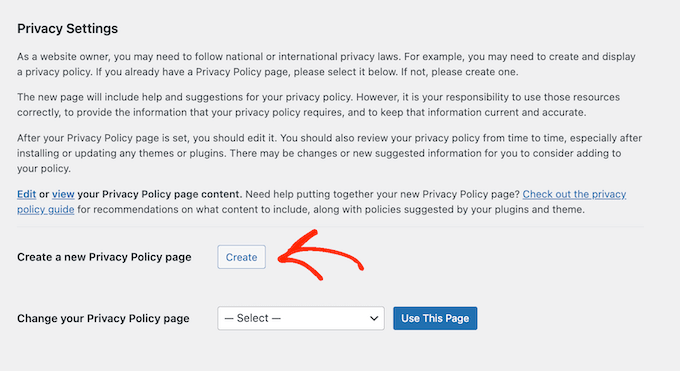
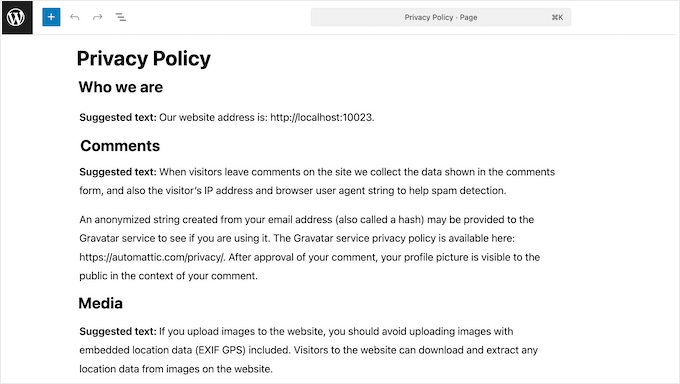
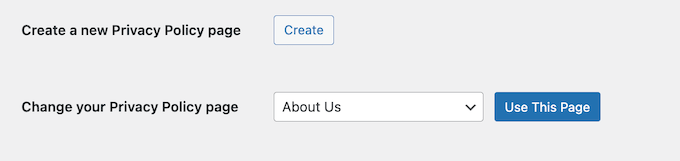
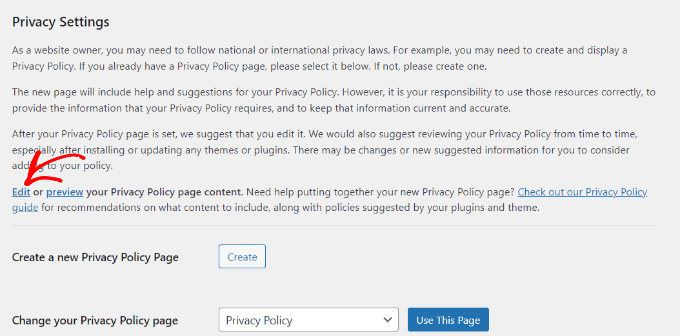
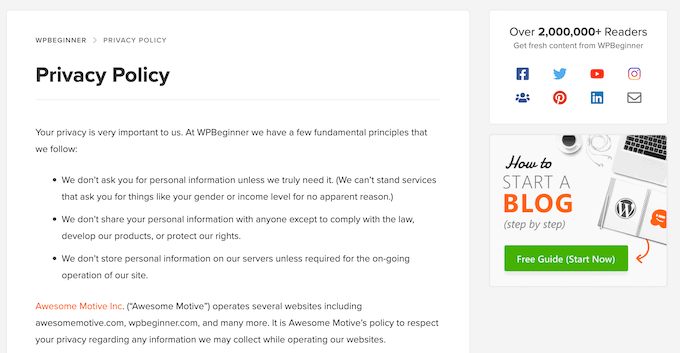
I’ve heard from many website owners who think a privacy policy is just some boring legal text that no one will ever read. However, a privacy policy is actually the best way to prove that you’re a responsible website owner. It is a page that clearly explains what personal data you collect, how you use it, and who you share that information with. It’s a literal map of your data practices that helps visitors understand the steps you take to respect their personal information. The good news is that WordPress comes with a built-in privacy policy generator, so it’s easy to create this important document. To get started, go to Settings » Privacy in your WordPress dashboard.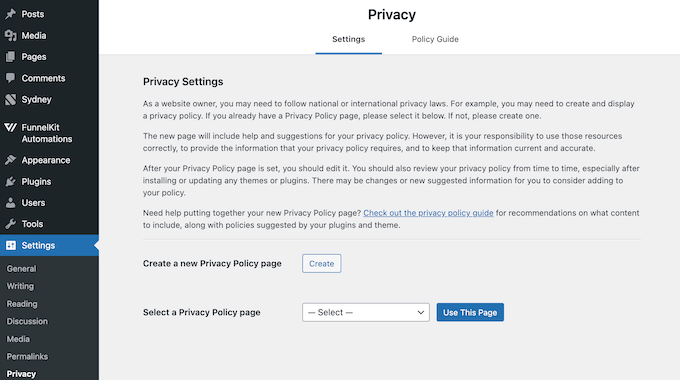
Add a Cookie Popup
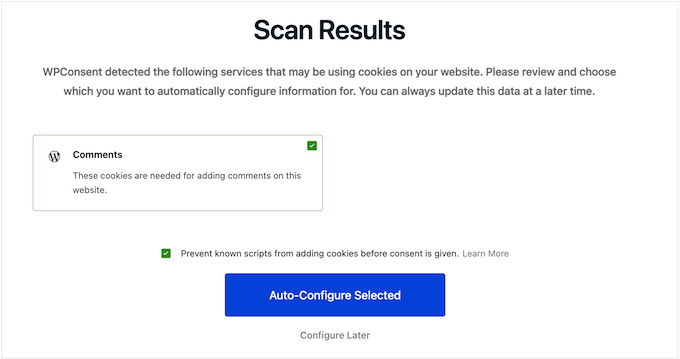
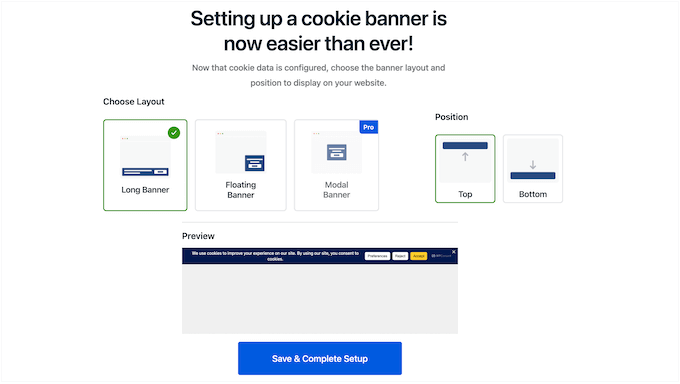
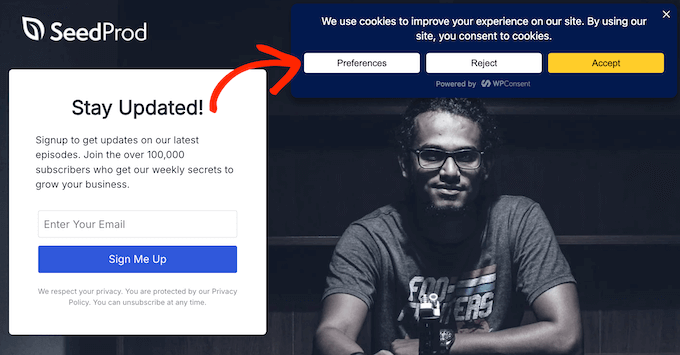
When it comes to collecting data, the LGPD uses an opt-in model for most cookies. This means you must obtain free, informed, and unambiguous consent before collecting any non-essential data. Thankfully, a well-designed cookie popup can clearly inform visitors about the types of cookies you use, the data you collect, and why you’re collecting it. It can also give visitors a straightforward way to accept or reject those cookies before any scripts fire. There are many different cookie banner plugins on the market. However, I highly recommend WPConsent because it makes adding a cookie popup to your site incredibly simple, while fully supporting LGPD’s opt–in mode.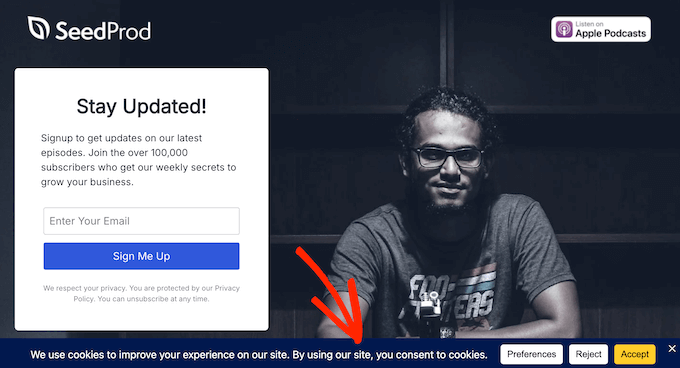
Expert Tip: Always test your cookie banner on a mobile device before publishing. Popups that look great on a desktop can sometimes cover important content on smaller phone screens, which can frustrate your visitors.
Expert Tip: While the free plugin handles standard compliance, advanced features like detailed consent logging and smart geolocation require the premium version of WPConsent.
Write a Separate Cookie Policy
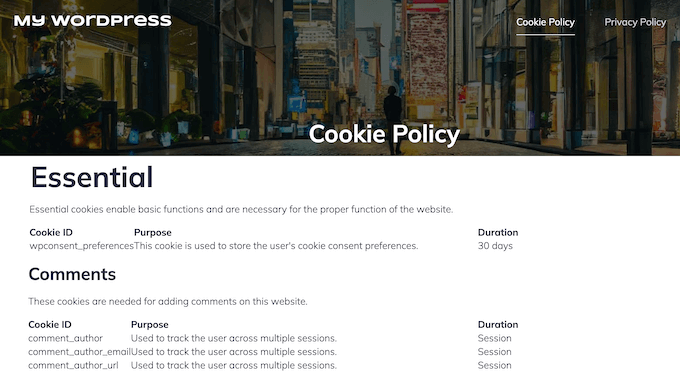
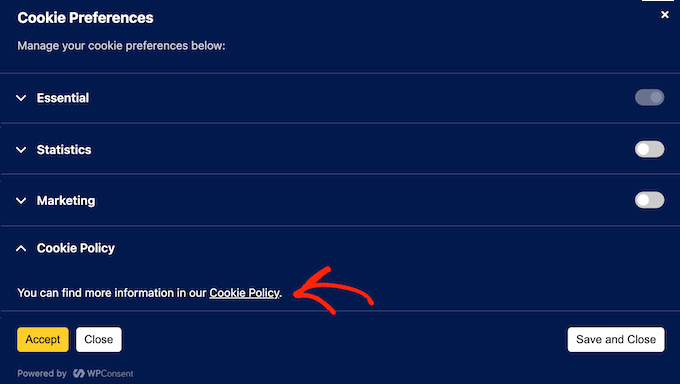
The LGPD states that you must provide ‘clear, precise, and easily accessible’ information about how you process data, including how you use cookies. To meet this legal standard without cluttering your privacy policy, I recommend creating a separate cookie policy. This is typically much less overwhelming compared to a huge, bloated privacy policy that tries to explain everything. In your cookie policy, you should clearly list the different types of cookies your site uses, like essential cookies, analytics, or marketing cookies. You should also explain their purpose, such as tracking visitors or delivering targeted advertisements. It’s also smart to specify what personal information these cookies collect, like IP addresses or browsing history. To encourage visitor trust, make sure this policy is easy to understand. This means avoiding technical terms or legal jargon, and instead using clear language that anyone can follow. Thankfully, a tool like WPConsent can do all this for you. WPConsent can scan your site and identify all active cookies. To turn this information into a cookie policy, go to WPConsent » Settings in your WordPress dashboard. Then, simply select the page where you want to display the cookie policy.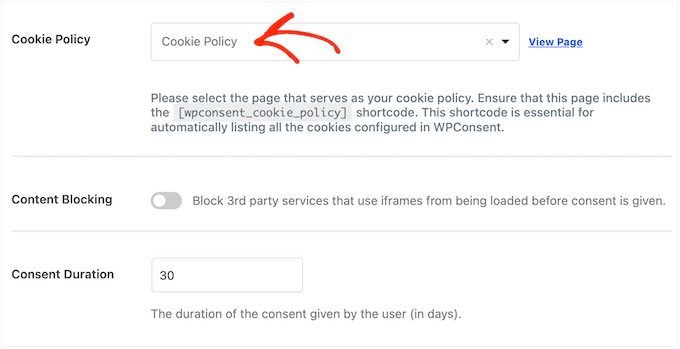
Block Third-Party Scripts
Major tracking solutions like Google Analytics, Google Ads, and Facebook Pixel often collect data from your visitors to build behavioral profiles. According to the LGPD, you’re responsible for managing how these third-party tools collect and use all of that data. Unlike laws that only require an opt-out link, the LGPD follows a strict opt-in model. This means you must block these third-party scripts until the visitor explicitly gives you permission to use them. So, how do you control external tracking tools? The solution is to use a plugin with automatic script blocking. This stops tracking scripts from loading until the visitor clicks ‘Accept.’ WPConsent has an automatic script blocking feature that works out-of-the-box. Behind the scenes, it automatically detects and blocks common tracking scripts like Google Analytics, Google Ads, and Facebook Pixel, without causing your site layout to break. As soon as the visitor gives their consent, WPConsent goes ahead and executes the script. This provides a truly smooth user experience because it doesn’t need to reload the page.Track and Log Visitor Consent
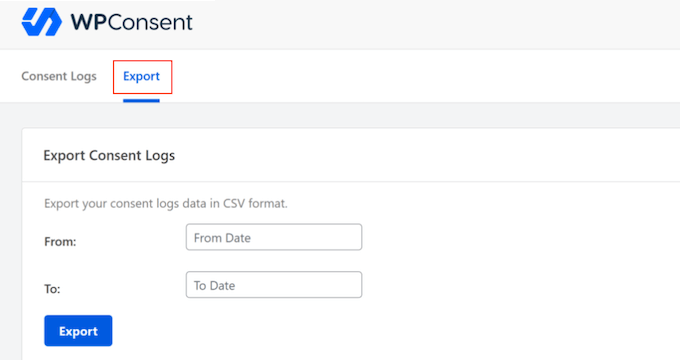
Simply getting a visitor’s consent is not enough. If a regulator ever audits your website, then you need to provide clear proof that each visitor gave their permission before you started tracking them. That’s why having a paper trail is the best way to protect your website, blog, or online store. Once again, WPConsent does the heavy lifting for you by automatically logging user consent. It records all important details, including the user’s IP address, their specific consent choices, and the exact date and time when those choices were registered. You can see all this information by heading to WPConsent » Consent Logs in your WordPress dashboard.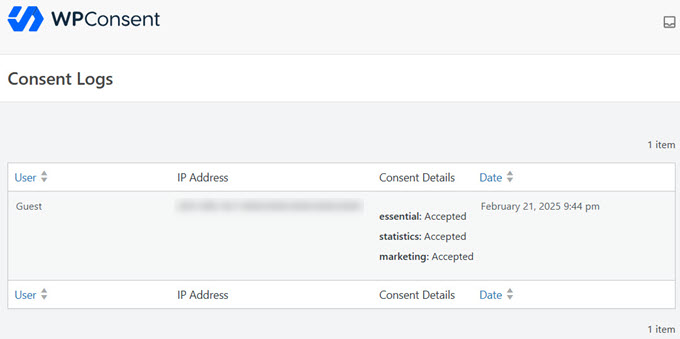
Build Trust with Opt-Outs
Under the LGPD, you must give visitors an easy way to revoke consent. In fact, Brazilian users have the legal right to change their mind at any time, even if they previously consented to having their data collected or sold. The easiest way to add an opt-out is by using WPConsent’s Do Not Sell add-on. This adds a dedicated page to your site where users can exercise their right to opt-out of sharing their data, even if they gave consent previously.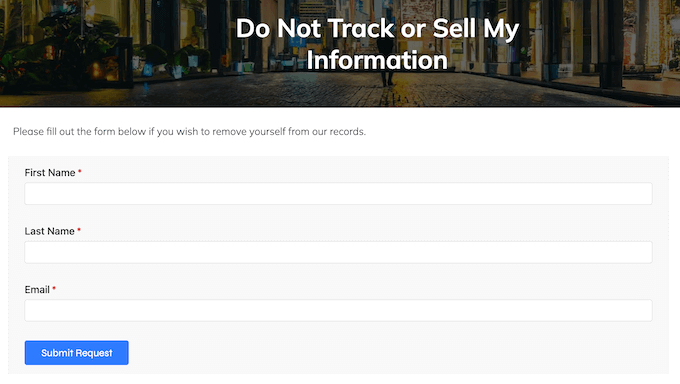
Support the ‘Right to Delete’
Just because someone gives you their personal information, doesn’t mean it’s yours to keep forever. Under the LGPD, that data always belongs to the user, so they can ask you to ‘forget’ it at any point. There’s several ways to accept and process data deletion requests, but one of the easiest is adding a form to your site. A good form will collect all the information you need to comply with the request, and then store all these requests in a centralized location ready for you to review. Under Brazil’s LGPD, you must fulfil data subject requests within a 15-day timeframe, so this streamlined approach is really helpful. To achieve this, I recommend using WPForms. It is the best drag-and-drop form builder for WordPress and simplifies LGPD compliance by offering pre-built templates for Right to Erasure and Data Request forms.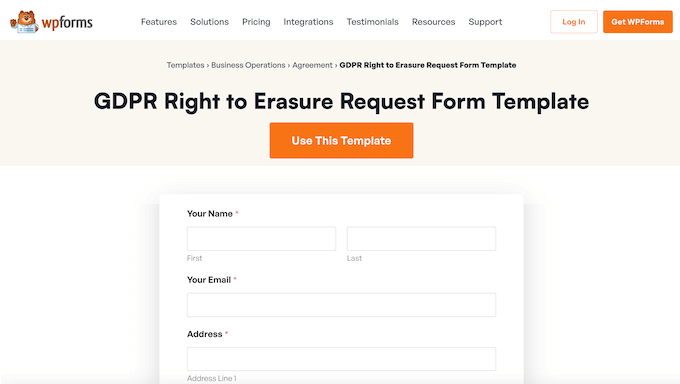
Warning: Deleting personal data is a permanent action. Before you use this tool, I highly recommend creating a complete backup of your WordPress site so you can restore your data if you make a mistake.
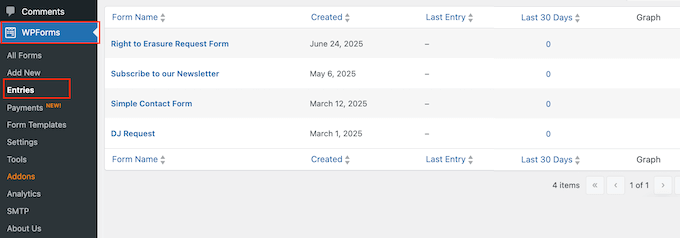
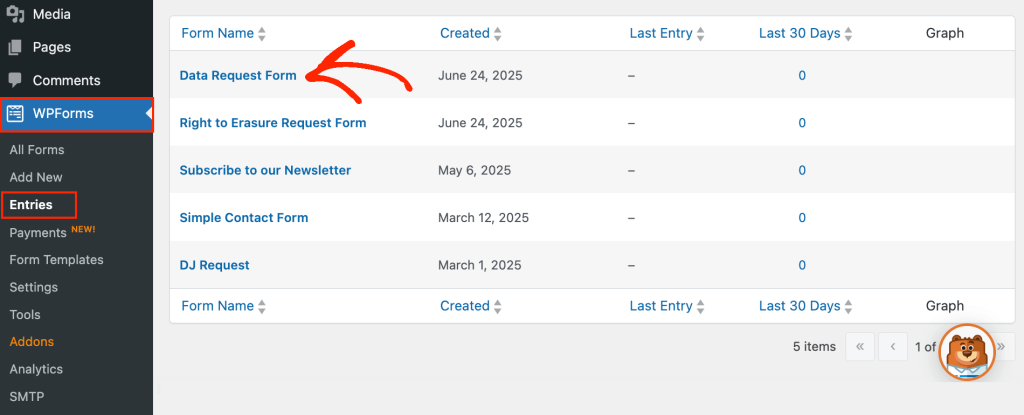
To review your entries, simply head over to WPForms » Entries in the WordPress dashboard.
Here, you’ll see all the forms across your entire WordPress website.
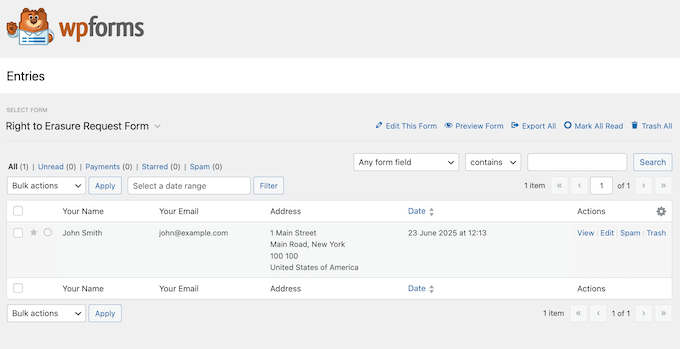
Pro Tip: Since there’s a strict deadline, I recommend reviewing your form entries as often as possible. Ideally, you should check at least once per week.
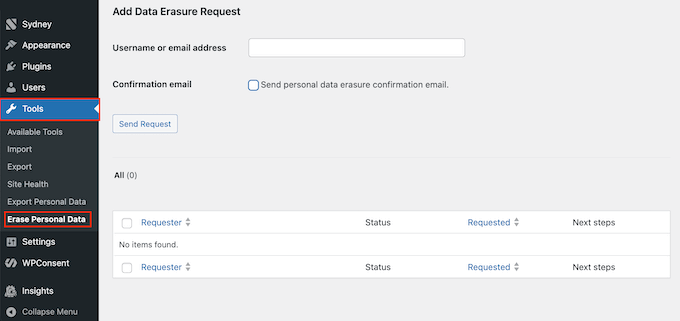
And once you receive a data deletion request, WordPress has a built-in Erase Personal Data tool. Just head over to Tools » Erase Personal Data to access it.
Handle Data Access Requests Efficiently
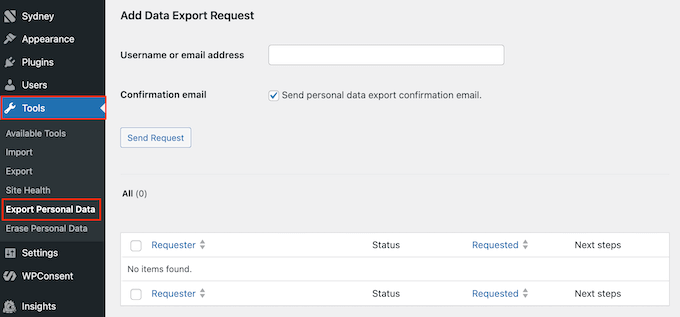
Under the LGPD, users have two powerful rights that complement each other: the Right to Access and the Right to Portability. Essentially, users don’t just have the right to look at their data. They also have the right to receive it in a portable file that they can take to another company or service provider. Without the right tools, you’d need to spend hours manually searching through email logs, contact entries, user profiles, and any other places where you store information about that specific user. However, by putting the right tools in place now, you can make these data access requests as easy as clicking a few buttons. First, you need to give visitors a way to submit their requests. Once again, WPForms makes things very straightforward by providing a ready-made Data Request template.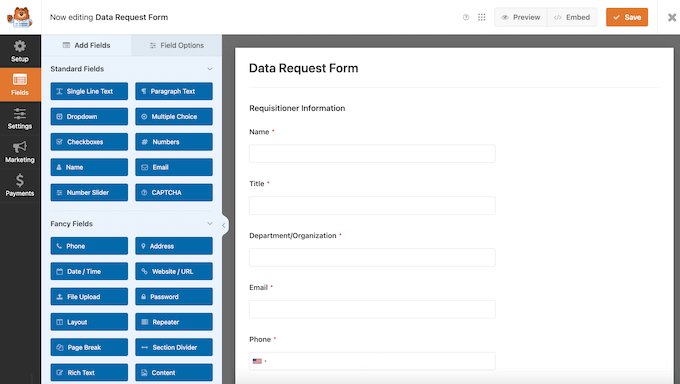
Frequently Asked Questions about LGPD
I remember when I first started researching data privacy. For every one question I answered, three more seemed to pop up. It’s a lot to take in! To help you find that perfect balance between legal compliance and growing your site, I’ve put together a list of the questions I get asked most often about the LGPD. Whether you’re worried about the size of your business or how the LGPD compares to other laws, these FAQs should help clear things up. Does the LGPD apply to small blogs and personal websites? Yes. Unlike some other laws that have a minimum revenue or data threshold, the LGPD applies to anyone who processes data related to people in Brazil. How is the LGPD different from the GDPR? They are very similar, but not identical. Both prioritize user consent and data rights, but the LGPD has its own specific timelines. For example, the GDPR gives you 30 days to respond to a data request. Meanwhile, the LGPD is stricter, requiring a detailed report within 15 days. Do I need a Data Protection Officer (DPO)? Most small to medium-sized WordPress sites shouldn’t need a dedicated DPO. The ANPD has stated that ‘small processing agents’ are exempt from this requirement. However, as your site gets more successful, it’s a good idea to keep checking the latest ANPD guidance, as you might grow into this category. Can I still use Google Analytics? Yes, but you must change how you load it. You cannot load the Google Analytics script as soon as the page opens. Under the LGPD’s opt-in model, you must use a tool like WPConsent to block that script until the visitor clicks ‘Accept’ on your cookie banner. What happens if I have a data breach? If your site is hacked or data is leaked, then you must notify both the ANPD and the affected users within three business days from the date you discovered the incident. This is the official timeframe generally required by the ANPD. I recommend drafting a ‘Breach Response’ document today and saving it, so you don’t have to start from scratch during a crisis. This should include templates that you can use to communicate with your users and the ANPD, and a detailed checklist of the steps you’ll take to address the breach. When notifying your users, the LGPD states you must use simple and clear language, with no legal jargon. In particular, you need to tell your audience:- What data was leaked
- The risks they face, such as potential phishing emails
- The steps you’ve already taken to fix the breach, and what actions the user can take to protect themselves, such as changing their password.
Additional Resources for LGPD Compliance
I remember when I was first trying to piece all these privacy compliance rules together. Sometimes, a single guide just isn’t enough, or you might want a more detailed guide for a specific plugin or task. To help you out, I’ve pulled together a list of the best resources from WPBeginner. I often return to these articles when I’m setting up a new project, just to make sure I don’t miss a single thing:- The Ultimate Guide to WordPress Privacy Compliance. This is our flagship guide that covers the ‘big picture’ of global privacy rules and what they mean for you as a website owner.
- How to Create Compliant Forms in WordPress. A deep dive into using forms to handle consent, data access, and deletion requests.
- The Ultimate WordPress Security Guide. I recommend checking this list to make sure your site is protected against hackers and potential data thieves.
- How to Know if Your WordPress Website Uses Cookies. A practical tutorial to help you identify every single cookie across your WordPress website.
- How to Allow Users to Delete Their Own WordPress Accounts. If you accept user registration, then giving them a way to delete their account is an important step in fulfilling the Right to Erasure requirement.
- How to Auto-Delete WordPress Form Entries, Data minimization is a lot easier when you don’t have to do it manually. This guide shows you how to set a cleanup task, so you don’t hold onto personal information for longer than you need to.
- How to Perform a Security Audit in WordPress. This is another must-read article for improving your website’s security, and preventing a data breach.














Leave a Reply